Showing posts with label MemeTips. Show all posts

Friday, 14 July 2017

New layout coming to App launcher in Google bar.

Current Layout


New Layout from Aug 1st 2017


To learn more - How to use the Google bar

To Customize your menu
Customize the launcher to show your favorite apps at the top. To do this, drag and drop them within the menu when you're signed in to your Google Account. 

Add more apps

Sign in to your Google Account.
Select Google apps Apps.
At the bottom of the menu, select More.
Drag the Google apps you want to the top of the launcher.
Add apps that are not currently in the "More" menu

You can also add Google apps that do not appear in the "More" section.

Sign in to your Google Account.
Open the app you would like to add.
In the upper right, select Google apps Apps.
Below the app name, select Add a shortcut.
Note: there may be Apps that you cannot add to the App launcher at this time.


Thursday, 9 October 2014

Do More with Google Forms

Google forms are the most wonderful way to automate data gathering, particularity for event registration and an almost unlimited range of applications.


See the Forms microsite here


.

Friday, 4 April 2014

Undo Sending a Gmail

With Google mail you have 5, 10, 20 and 30 seconds to change your mind about that email..

ZZ

Friday, 11 October 2013

Gmail - Managing that Inbox

Simple tips for managing your inbox in Gmail so it's always empty.


..more tips via the Google Apps Learning Center:


http://learn.googleapps.com/apps-in-a...


Author: Des Donnelly

Friday, 16 August 2013

Freshbooks App for Android


FreshBooks provide a robust, secure online invoicing solution for your small business. 

Try Freshbooks Free for a month

Try Freshbooks Free for a Month

We are Freshbooks aficionados and work with clients on deployments and customisations so we are delighted to see the new Freshbooks App for Android just released this week
With the new Android App run your business from anywhere!


Invoicing at your fingertips


Track time on the go


Author: Des Donnelly


Thursday, 8 August 2013

Android Offline Translation


This is an old story (March 2013) but in mentioning offline translation to clients (who are on holiday) it is surprising how many do not know about offline translation for Android;-


At the time Google said;-

"Today we're launching offline language packages for Google Translate on Android (2.3 and above) with support for fifty languages, from French and Spanish to Chinese and Arabic."

Read the full article here

..taitneamh a bhaint as do laethanta saoire  :-)

Author: Des Donnelly

Tuesday, 6 August 2013

Key Resources for those Going / Gone Google


When using Google Apps for Business it is useful to be aware of key resources that address current Apps Status and Known Issues. There are extensive resources to assist you and your users throughout the change management process. 

For overall performance information on Google Apps services, please see the Apps Status Dashboard. and to see what material is available for support see  Resources

From the Apps Documentation & Support  page there is a wide range of 'How To's' and 'Fix An Issue' articles.

Setup & deployment has sub-sections covering;-
 User Resources  |  Deployment Webinars  |  Change management  |  Partner Directory

For General issues & solutions  |  For Known Issues

If you are experiencing a problem related to GmailCalendarDrivePostiniGoogle+, or Hangouts, click the name of the product to go to the product-specific Known Issues page.

For those considering Going Google  visit the Google Enterprise site  or have a look at the  Demo page  to see what it is like to use a Google Doc - or read more about Why to go Google from Memeonics

Author: Des Donnelly

Monday, 15 July 2013

Newly Released Google Databoard.


Google say;-
"Need some stats for a presentation? You shouldn’t have to go data mining. We’ve created this interactive tool to help you quickly find what you need from our vast archives of industry-leading research."

Read more about Google Databoard   or  Try It Now


Author: Des Donnelly

Monday, 29 April 2013

Enable Google Now Search App for Android/IOS


This is for Google Apps for Business customers.. Join Us :-)
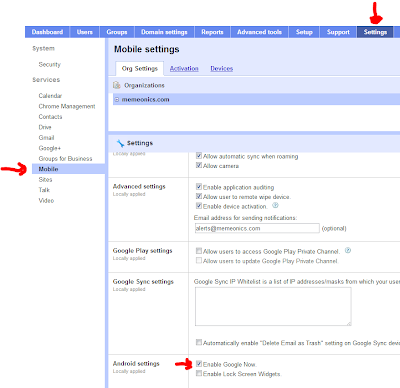
Go to Dashboard / to Settings / to Mobile / tick Enable Google Now.. that's it done
Read more about Now.. now! http://www.google.com/landing/now/

Saturday, 13 April 2013

10 things you can do with Gmail / Google Apps for Business

become a Gmail ninja


Customers are often amazed at the features Gmail and Google Apps for Business provides right out of the box, here are 10;-


  1. Undo Send - undo or recall an email for up to 30 seconds. 
  2. Auto translate - translate incoming messages automatically. 
  3. Preview Google Docs - without leaving Gmail, e.g. contact form data. 
  4. See your Calendar in the left hand navigation panel 
  5. See your Quick Links (regular things you search for) in the left hand navigation panel 
  6. See your most recent Google Docs in the left hand navigation panel 
  7. Delegate your email to an assistant 
  8. Remove bad language - even from yourself  ;-)
  9. Remove prohibited attachments, e.g. mp3, or other file types on your watch list 
  10. Auto forward to a colleague based on a filter 

Learn more about Gmail Features

Sign up for our monthly Newsletter  containing tips and tricks on how to get the most from your Google Apps for Business set-up or  email us directly  to learn how to implement a feature mentioned here.

Wednesday, 13 March 2013

Notifications in Apps Panel


The Alerts & Notifications box in the admin control panel has now been replaced with a new Notifications Inbox. This new feature can be accessed by clicking on the bell icon on the top right. Admins now have the ability to see the number of available notifications. They can also dismiss notifications that aren’t important.

Saturday, 9 March 2013

Preview Files in Google Drive


Preview files in Google Drive by right clicking and selecting Preview - use the arrows left or right to 'scroll' from document to document or image to image in a folder and use the the mouse wheel to scroll 'down ' from page to page within a document.

Document refers to the broad range of file types you can store, access and otherwise use on Drive and can be a pdf or a Word document.

You can use Ctrl C to copy text from within documents in this preview mode and also use the zoom at the bottom right to increase or decrease the view.

This feature is available to customers on Rapid Release.


Read the full post on the Google Enterprise Blog  or read more about Viewing images, videos, documents, and other files in Drive

Monday, 4 February 2013

Gmail Search

The awesomeness of Gmail Search !


There are a wide range of operators possible with Search - view an article on Advanced Search here
.
.

Sunday, 3 February 2013

New version of the Google Docs Forms Editor


Forms allow you to create questionnaires or contact data from the web and then view the responses in a spreadsheet. A new version of the forms editor launched Jan 30th.

Availability of this update depends on whether you are on Rapid Release (over the next few days) or Scheduled Release (in the coming weeks). You can create forms directly from Google Spreadsheet or Drive, or install the Chrome Web App  for easy access from your browser.

Tips & Tricks...


Saturday, 27 October 2012

Windows8 - Get your Google Back ;-)


Watch the video or just jump to the url and get it back

Monday, 23 July 2012

the email log ninja !

Often the poor Administrator is faced with questions like;-
  • I sent it, it never arrived, Why
  • I'm not getting any mail from blah blah@blah
  • and the ultimate - my email is not working right
Alas Users always seem to see a different screen and attempts to replicate issues often end in failure, this generally brings no credit to the expert Administrator and is often met with;-

"well it wasn't working yesterday"  :-)

Enter the email log ninja !

Email log search gives administrators the ability to sift through the last month of delivery logs for their domains and evaluate message transit. This is useful for tracking down a sender or recipient's missing messages and identifying their route to your users' inboxes.


and also see
Viewing message details with email log search
Interpreting message details with email log search

Thursday, 19 July 2012

Editing Documents Offline !!

It will be possible to edit & comment on Documents offline from July 24th with a number of caveats;-
  1. you must be running the latest version of Chrome or ChromeOS and install the Google Drive Chrome app to edit offline.
  2. Offline editing is only available for Google documents at this time. It is not yet available for Google spreadsheets or presentations.

There is a sequence of steps to be followed;-

1. Allow offline access for your computer

see http://support.google.com/docs/bin/answer.py?hl=en&answer=1628469

2. Sync items to view offline
see

http://support.google.com/docs/bin/answer.py?hl=en&answer=1628512


Tip: use offline editing just for documents that you own since any modifications made by the Document Owner have precedence !!

For more information see 
http://support.google.com/docs/bin/answer.py?hl=en&answer=107972